The product
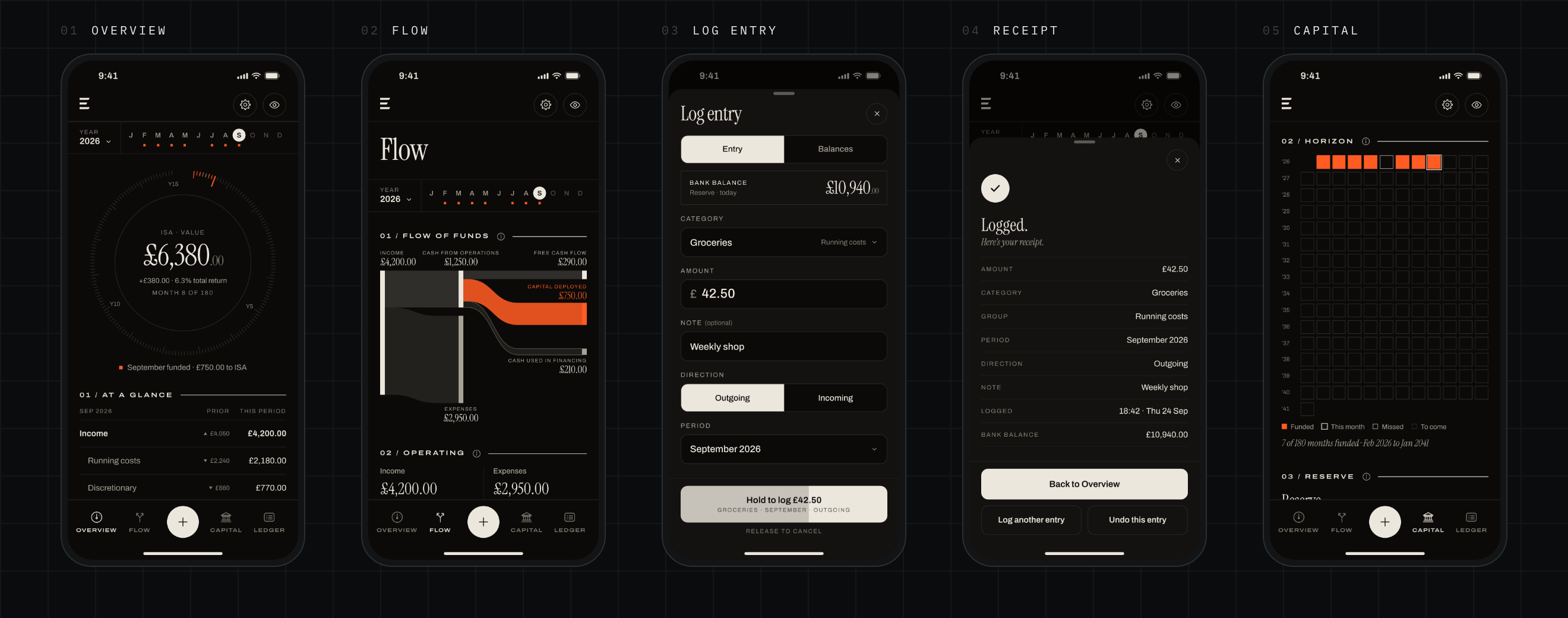
Most budgeting apps connect to your bank, sort your spending for you and send your figures to their servers. Erkos does the opposite. You log every pound by hand, read each month as a statement, and your data stays on your iPhone and in your own iCloud.
It’s for people who already keep their money in a spreadsheet and want something calmer and more disciplined than a budgeting app. The idea underneath is a habit: log it every day, close the books every month, and every year see it add up.
Past the spreadsheet
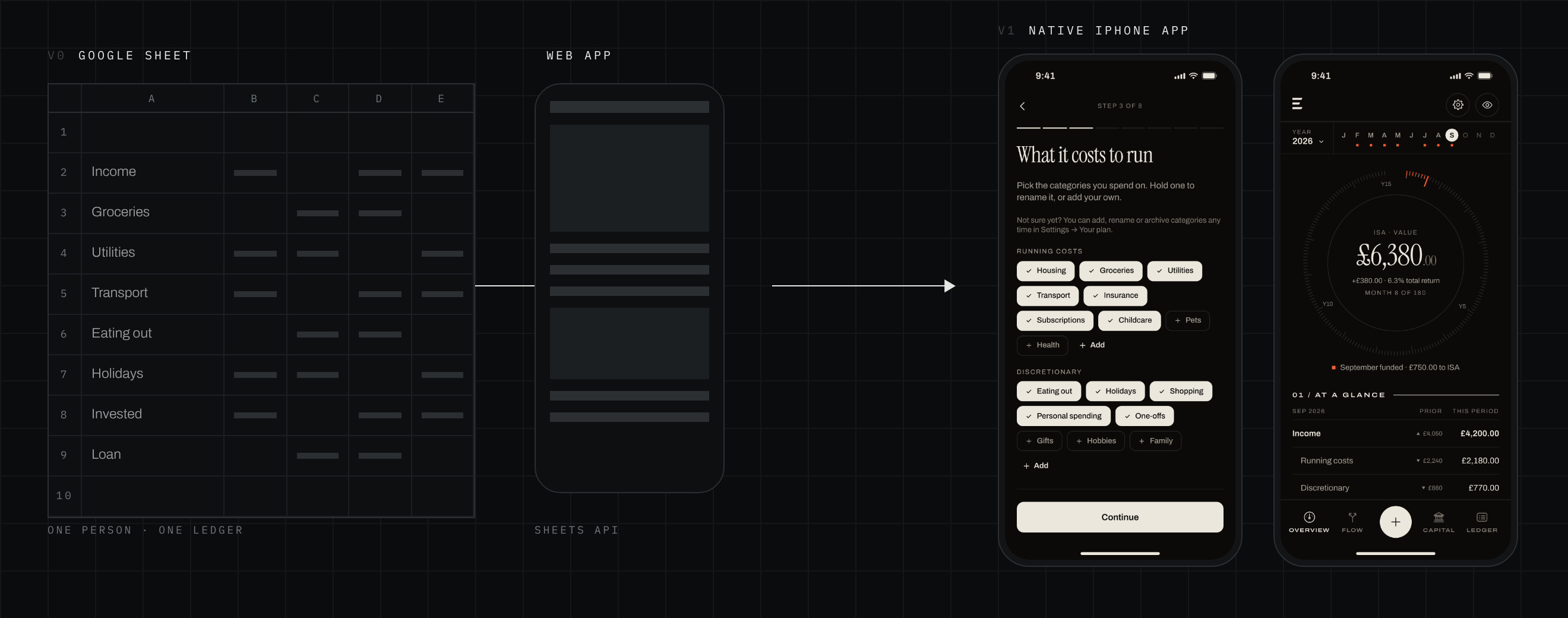
The first version was a tool for one person: me. A Google Sheet held the ledger, and a phone web app read it as a dashboard and wrote entries back through the Sheets API, with a guard that refused to write if a row label didn’t match. It proved the ideas. Seeing each month as a statement changed how I spent, and logging by hand kept me honest.
Turning it into something others could pay for meant keeping those ideas and replacing everything that assumed me. The spreadsheet, my names and my own targets all had to go. Every name and figure in Erkos is now set by the person using it, and the record lives on their phone, not in a sheet.
Native, not a wrapped website
App Review turns away thin web wrappers, and a finance app has to feel at home on the phone. The web app became the reference for the look, not the code: every screen was rebuilt in SwiftUI.
Built for sync from day one
Every stored property has a default or is optional, with no unique constraints and last write wins: the rules iCloud sync needs. Money is held in pence, never as a floating-point number.
A month, read as a statement
The core of Erkos is a model, not a screen. Each month is laid out like a company’s cash flow statement: income, operating costs, cash from operations, financing, capital deployed and free cash flow. A surplus tops up your reserve; a shortfall comes out of it.
The language had to work for someone who has never read a set of accounts. Every term has one plain definition of 17 or 18 words, shared word for word by the in-app glossary and the website. Sections carry an ⓘ that explains what they show, and free cash flow’s works your own numbers through, so the statement teaches itself.
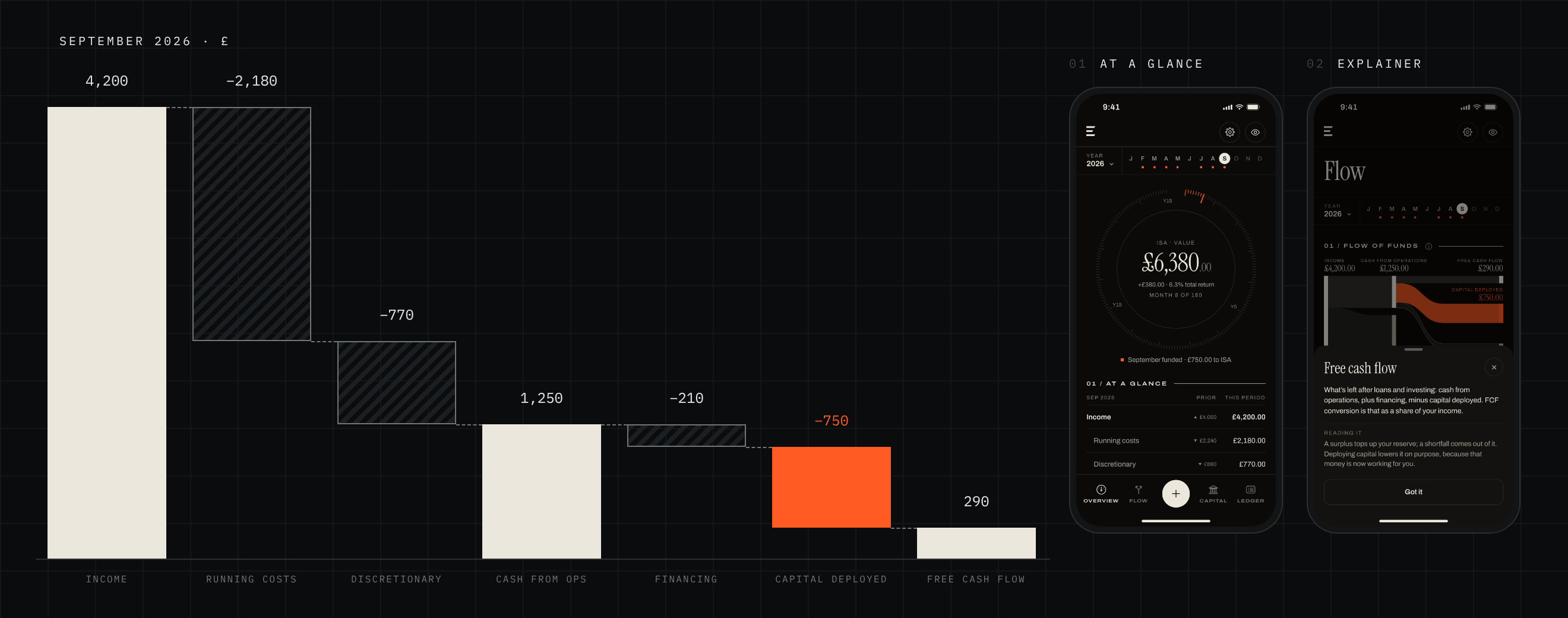
Capital deployed is never spending
Money moved into an investment leaves your bank, but it isn’t gone. Erkos counts it on its own line, the only line drawn in orange, so a month spent investing never looks like a month spent badly.
Running costs apart from discretionary
What it costs to keep your life running and what you choose to spend are always shown separately. Categories can move between the two, and their history moves with them.
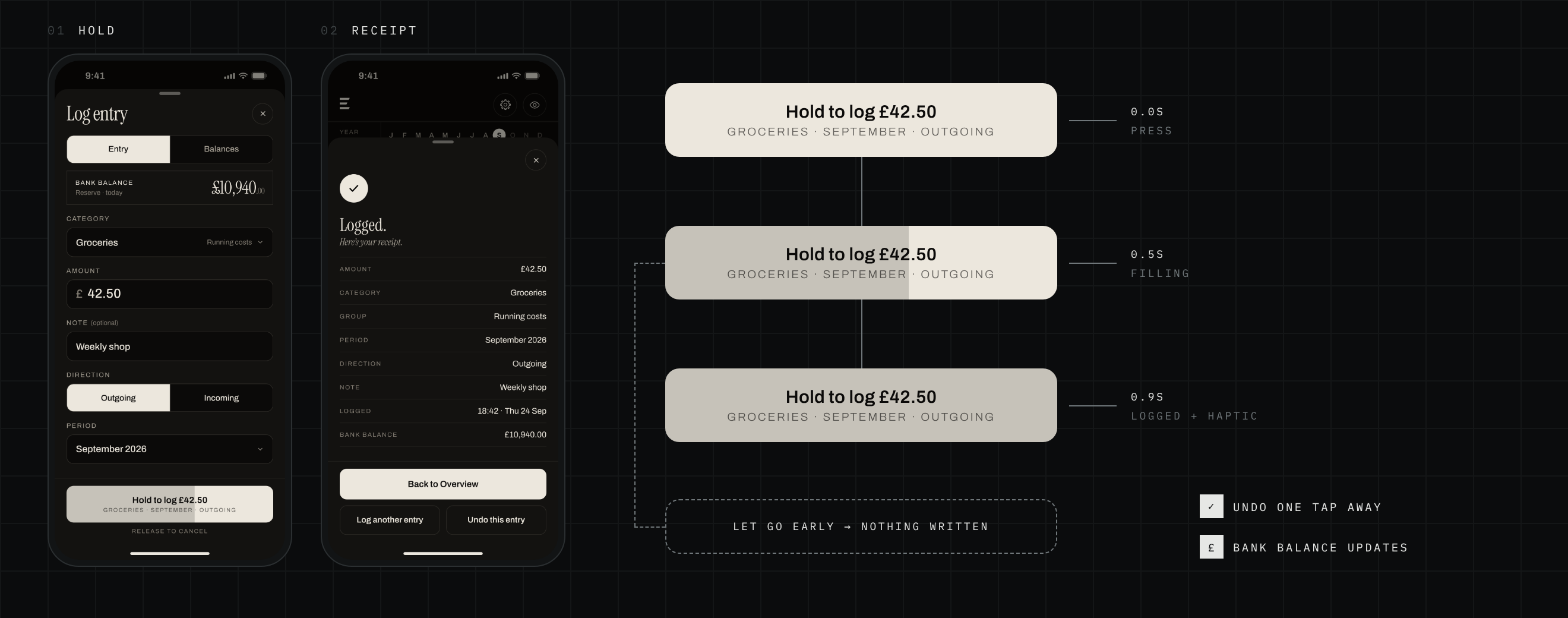
Hold to commit
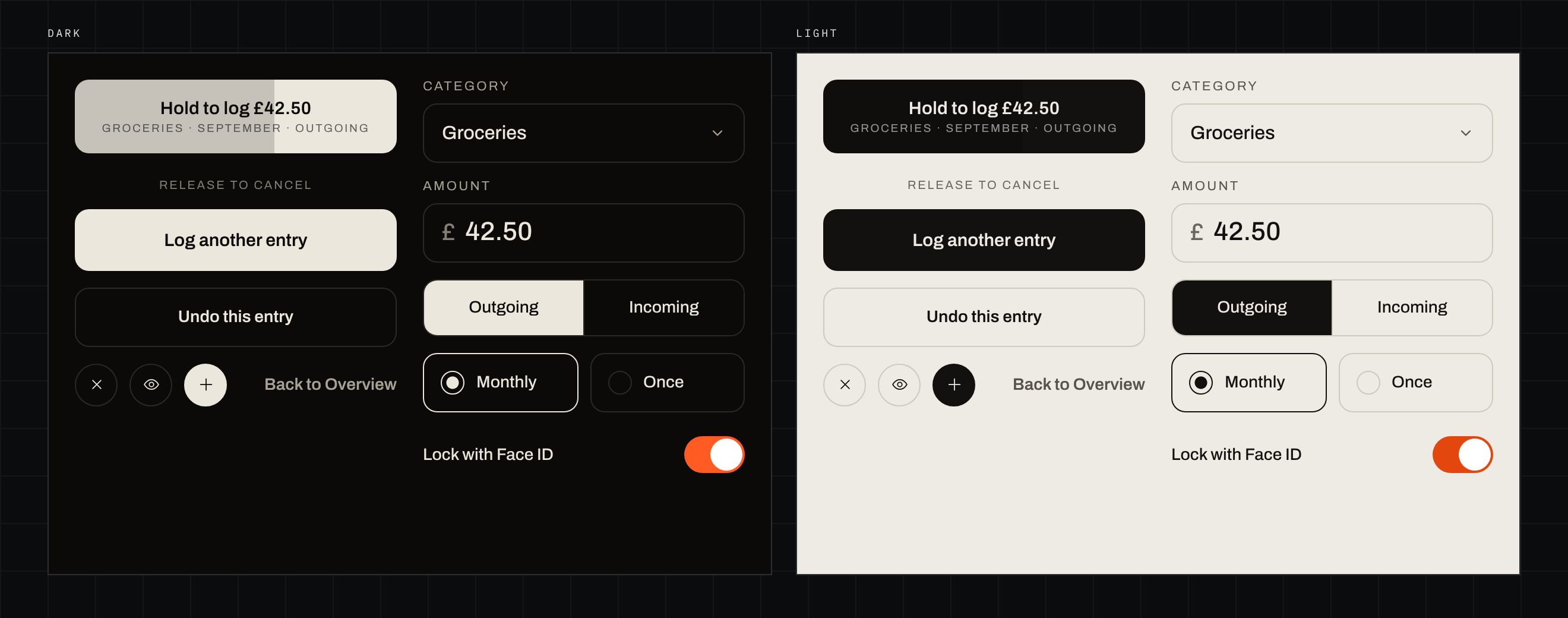
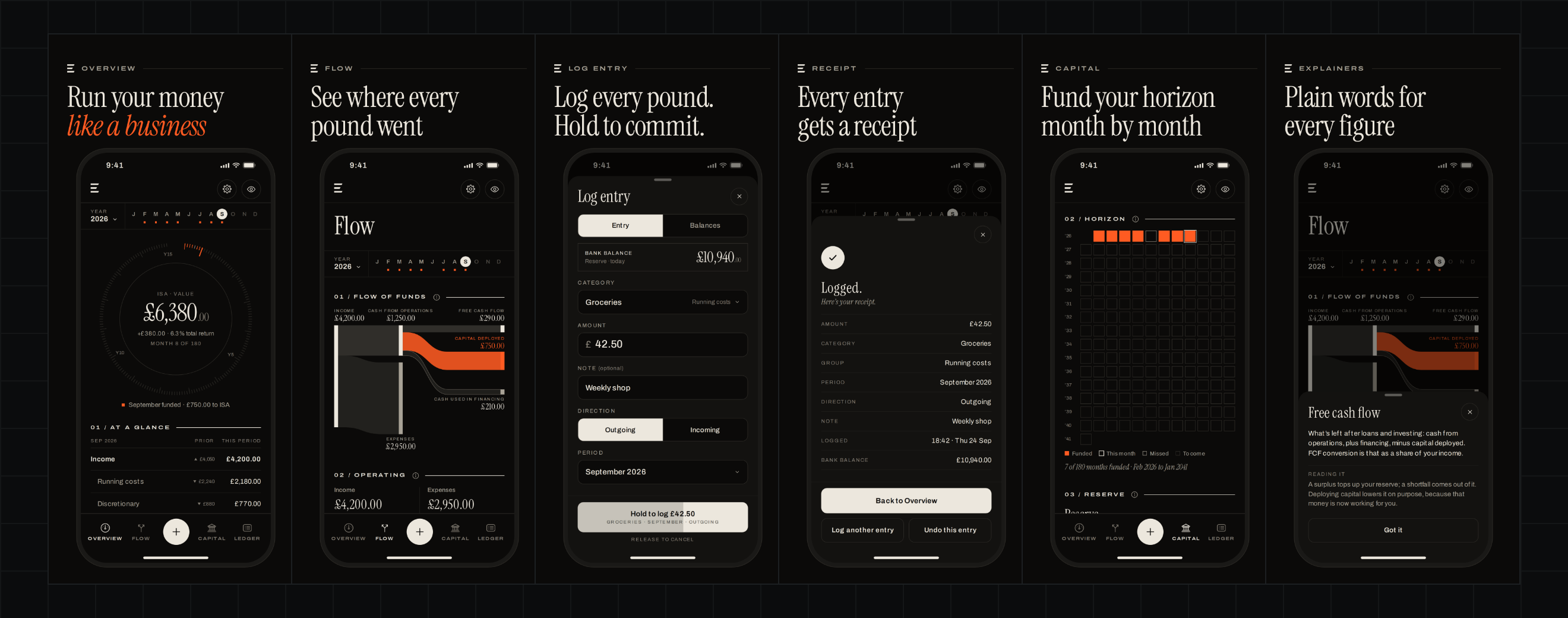
With no bank feed, logging has to be quick, but it shouldn’t be careless. The + sheet opens on the last category used, with the bank balance at the top. The button spells out exactly what it will do (“Hold to log £42.50”, then the category, month and direction) and fills over 0.9 seconds while held. Let go early and nothing is written.
Every entry ends in a receipt: amount, category, period, time and the new bank balance, with Undo one tap away. The wording was tuned in small rounds. “Hold to write · release to cancel” became just “Release to cancel”, and “hold to commit” became the feature’s name everywhere it’s explained.
See where every pound went
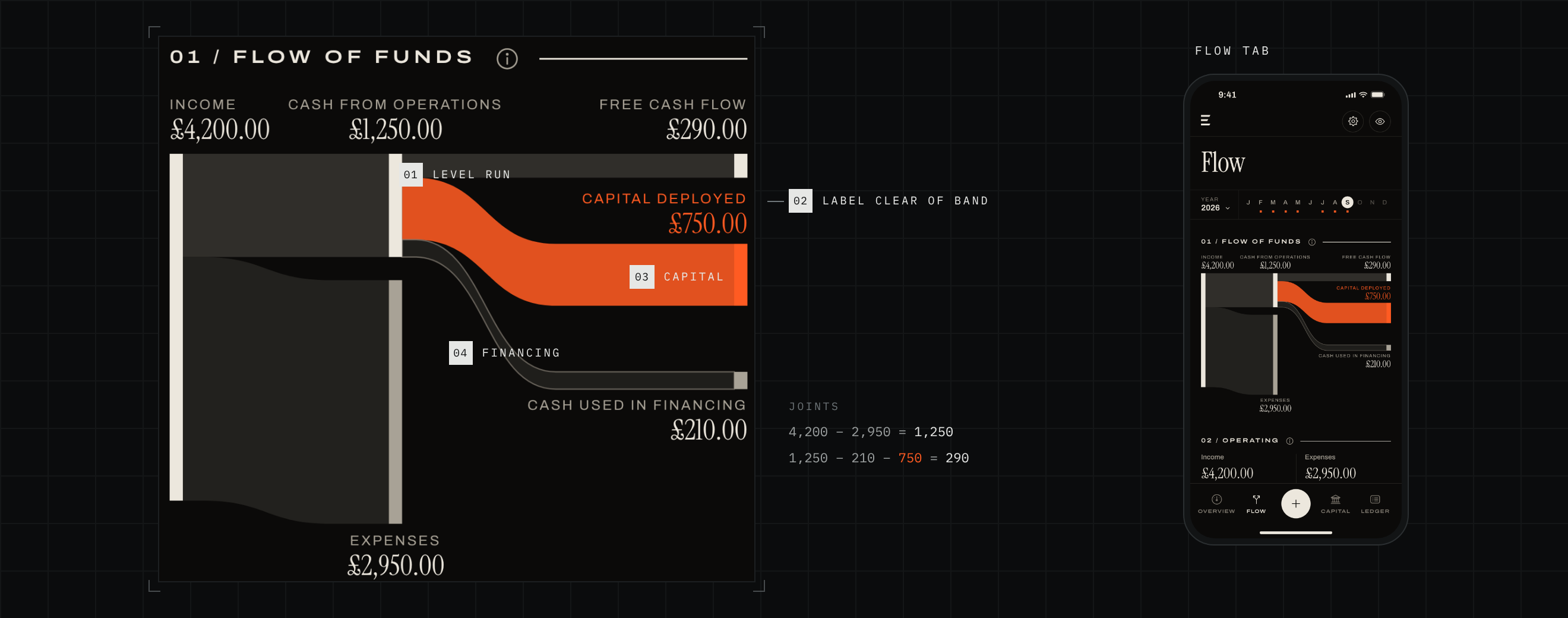
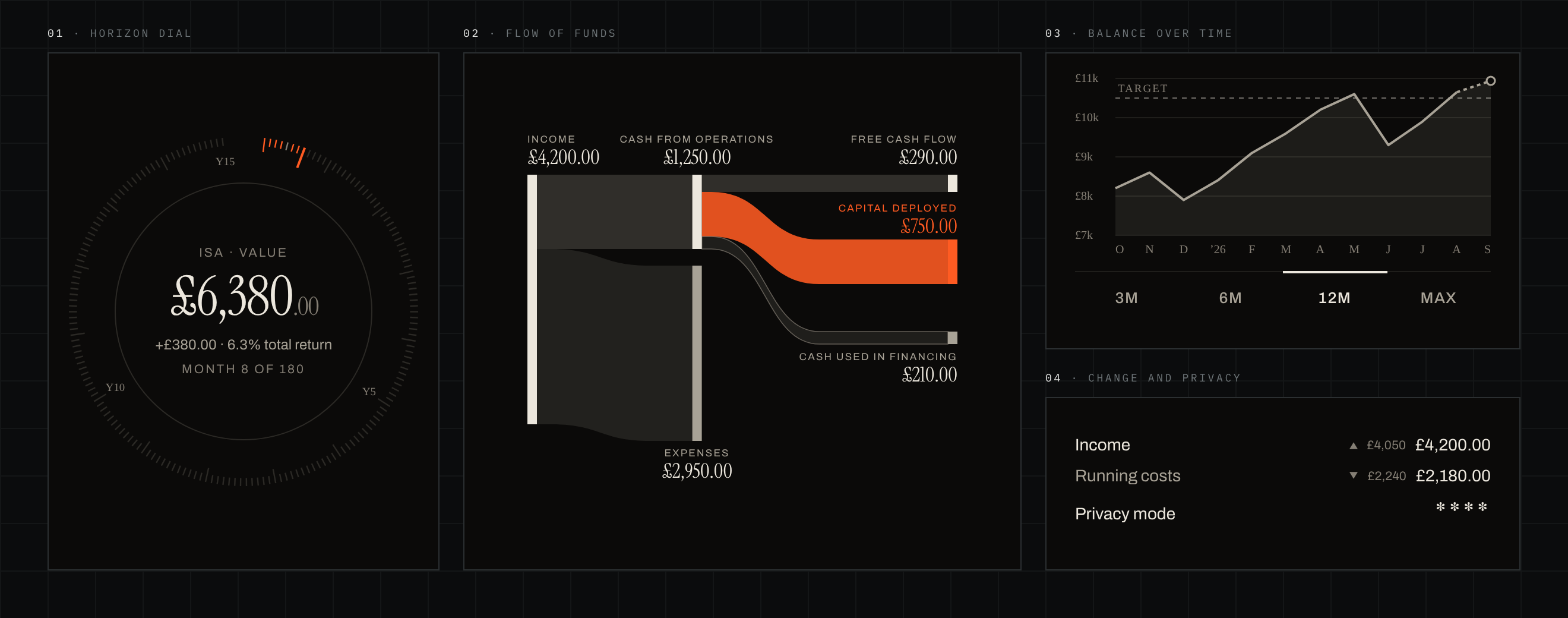
The Flow tab opens on a flow of funds: a Sankey diagram drawn from scratch rather than taken from a charting library. Income enters on the left, splits into costs and cash from operations, then into free cash flow, capital deployed and financing on the right.
The web version had taught me what goes wrong. Labels landed on bands, so now each band runs level for a stretch either side of its node, leaving a clear space above for the label. A Sankey is a conservation diagram, so the layout is built to balance: when income falls short, the reserve or borrowing makes up the difference as its own outlined band.
The habit and the horizon
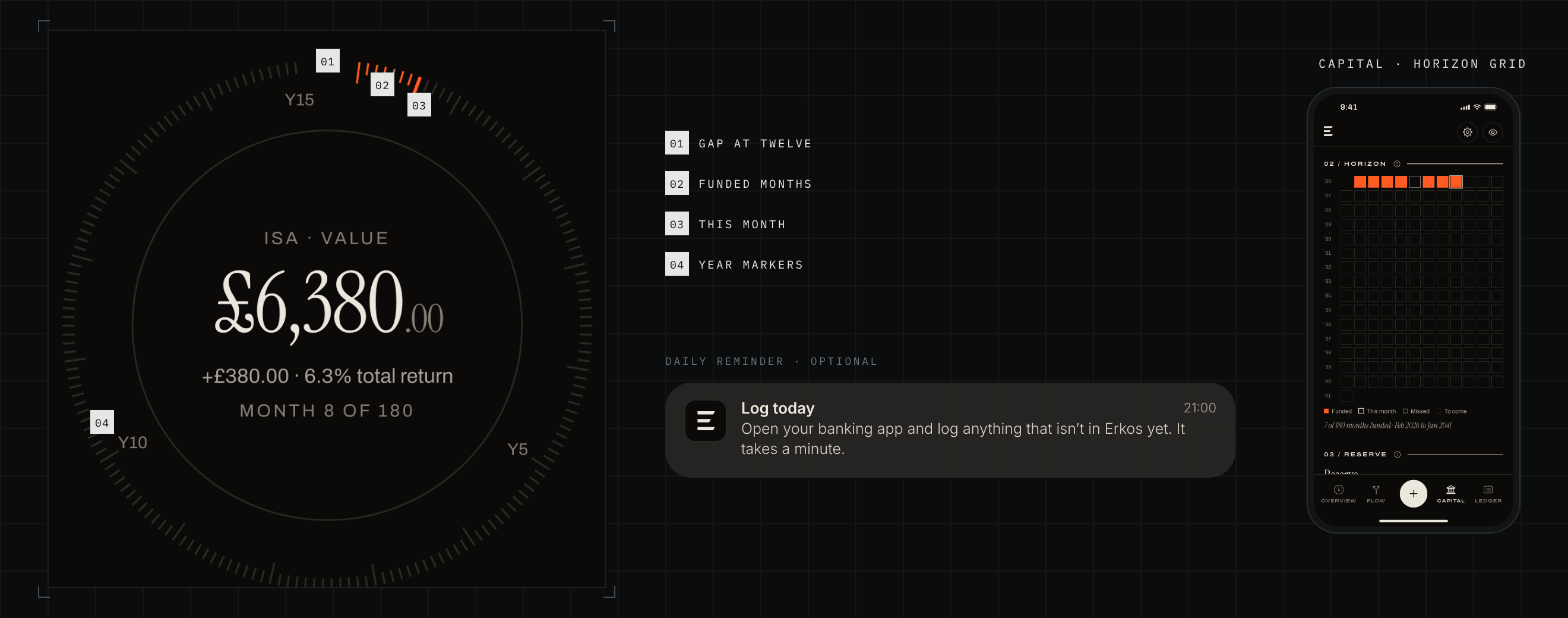
Overview centres on a horizon dial: one tick per month across a plan of 5 to 25 years, on a 346° sweep with a gap at twelve o’clock. Each month you put money to work lights its tick orange. On launch the funded months sweep in, and a month that becomes funded pulses with a success haptic. With Reduce Motion on, the haptic stays and the movement goes.
The rest of the habit is built in too. An optional 9pm reminder rotates ten plain messages, never with figures or guilt. At the month’s end you close the books: a checklist, the statement against last month and a one-page PDF. The first time a month’s target is met, a short sheet says “Your future, funded”.
A blank app becomes your plan
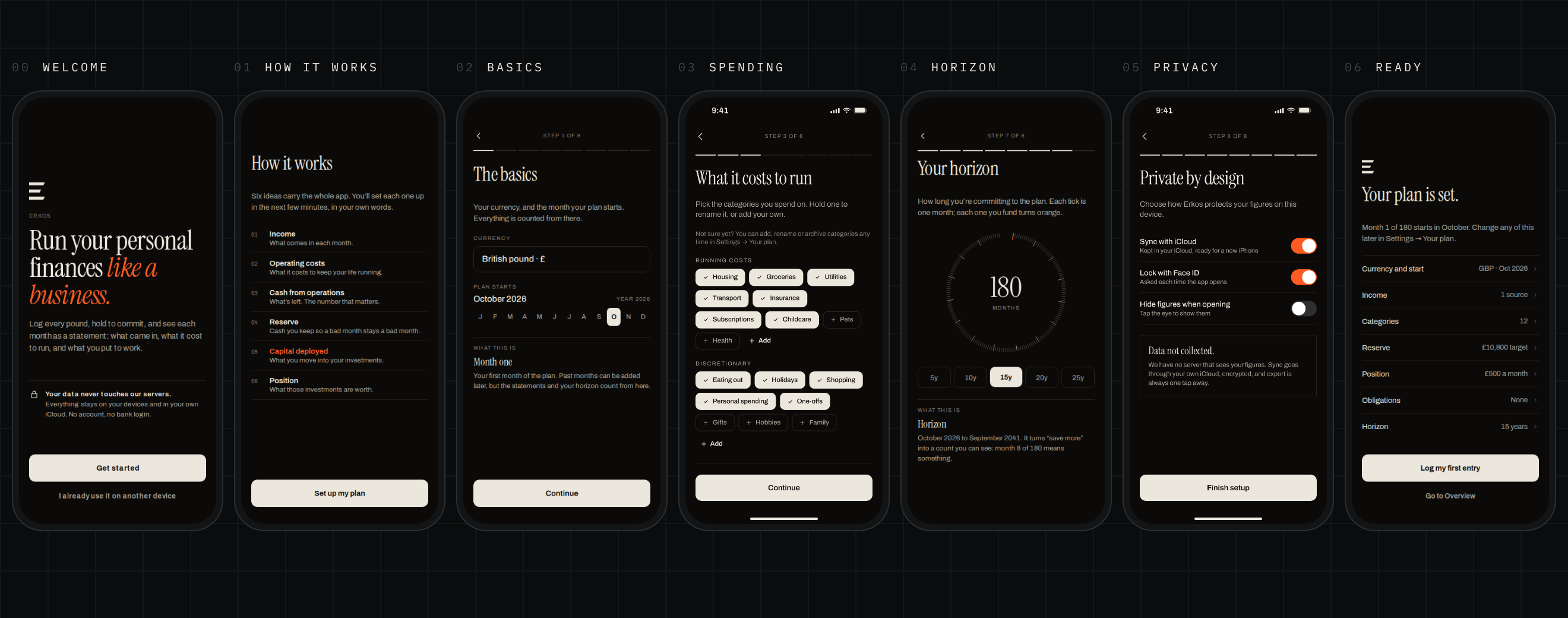
The private tool knew everything about me. Erkos knows nothing, so onboarding does the work: Welcome, How it works, then eight short steps (basics, income, spending, reserve, position, obligations, horizon and privacy) before a summary that ends in “Log my first entry”.
Each step ends with a short “What this is” card, so you learn the model while you set it up. Sensible defaults keep it quick: a starter set of categories in two groups, and a reserve target pre-filled at three months of running costs. A tour after setup points to each tab once.
Private by design
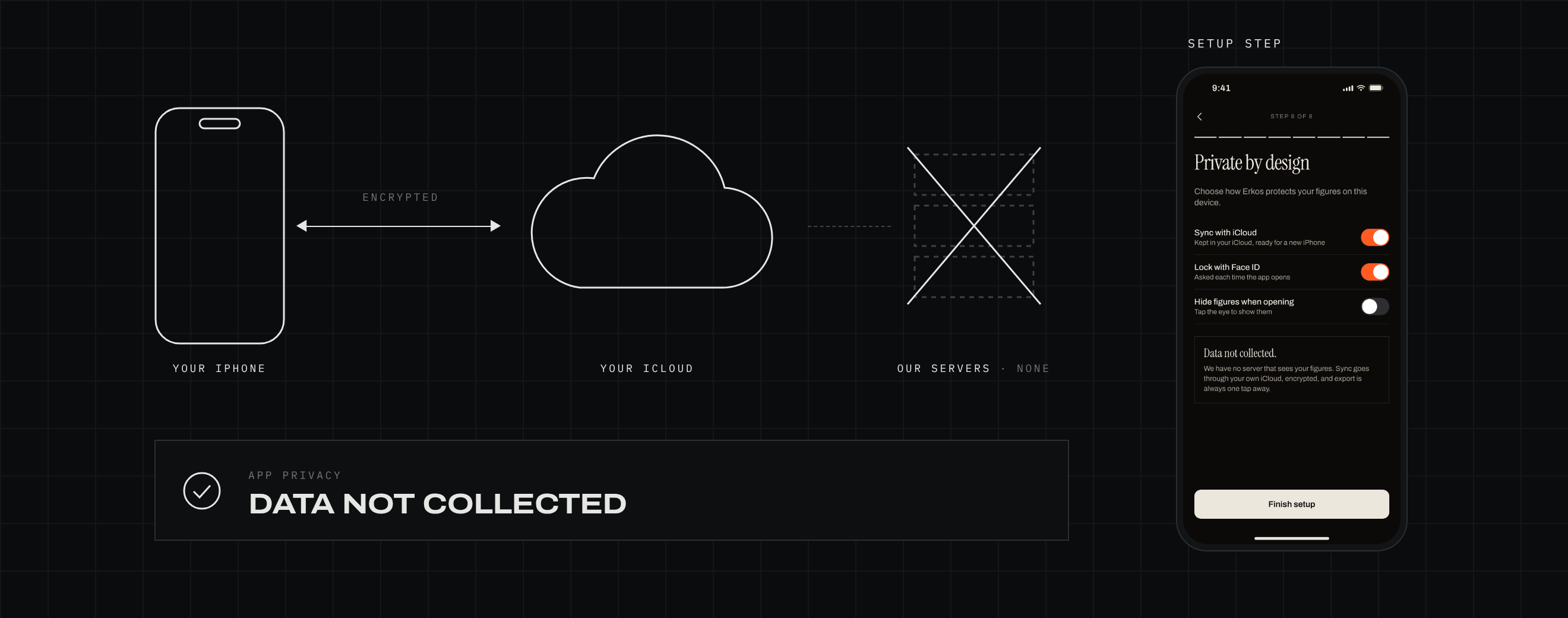
“Your data never touches our servers” is the product’s promise, and it shaped every decision. There’s no backend, no account, no bank connection, and no analytics or crash-reporting SDK. Data lives in SwiftData on the phone and is set up to sync through the person’s own iCloud, with names, notes and figures marked for encryption. The App Store label will read Data Not Collected.
That rules out the usual product toolkit, so the design has to make up for it. Feedback comes by email and App Store reviews. A backup is a JSON file you save yourself, and the ledger exports as CSV. Privacy mode masks every figure and blurs the charts, with Face ID on top.
No server, still a business
A free month, then a yearly or lifetime plan through StoreKit 2. The free month follows the Apple ID using Apple’s own signed record, so it can’t be reset by reinstalling, and no server is needed.
Your data stays yours
When the free month ends without a plan, only logging stops. Every page, the ledger and export keep working, because the record belongs to the person who wrote it.
The design system behind it
Erkos runs on a small design system of its own, carried over from the web version and rebuilt in SwiftUI. Every colour, typeface and component is defined once in code and shared by every screen and the Home Screen widget. The mockups on the site and in the App Store are drawn from parts that follow the same code, so they never drift from the app.
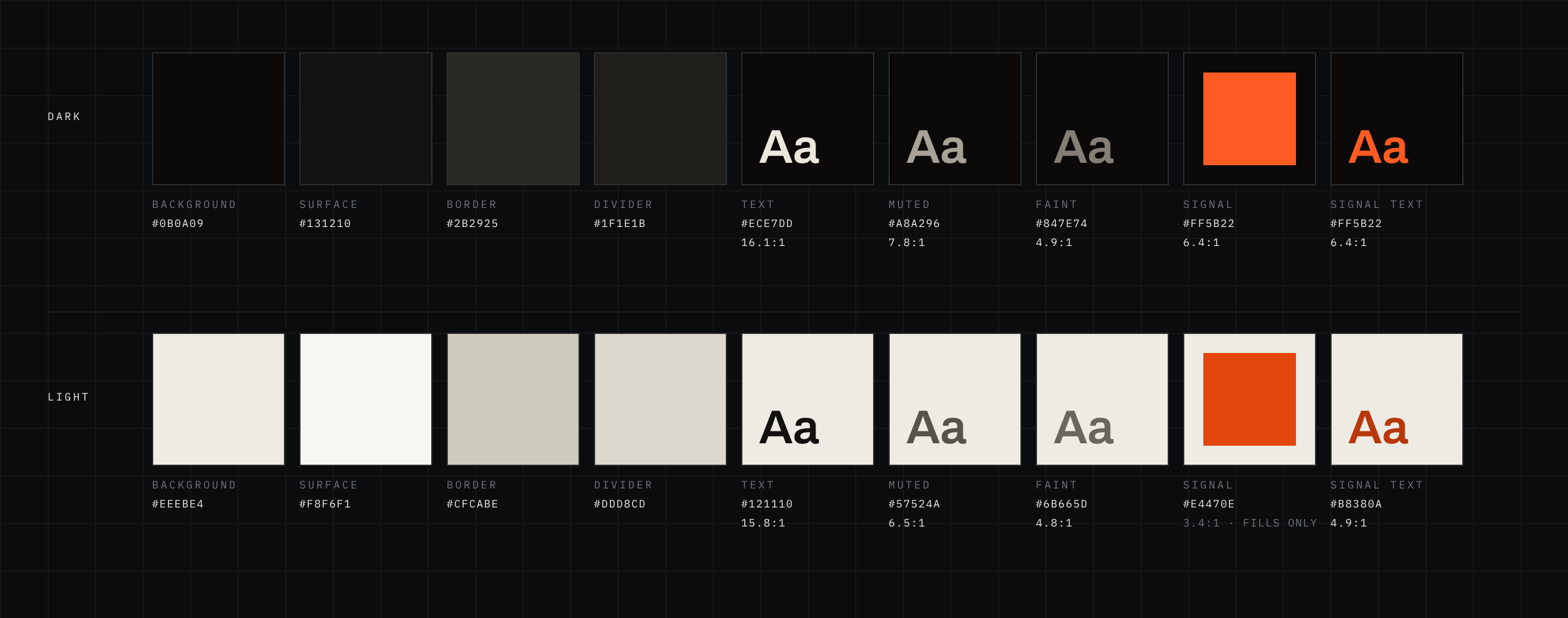
Colour. Seven tokens, each with a light and a dark value, and one signal colour. Hairlines do the work that boxes usually would. Orange has one meaning, capital, money put to work; the only exceptions are switched-on toggles, the launch-price tag and the tagline on the Welcome screen. In light mode the brand orange only reaches 3.4:1 against the background, so text uses a deeper orange that reaches 4.9:1, while fills and lines keep the brand colour.
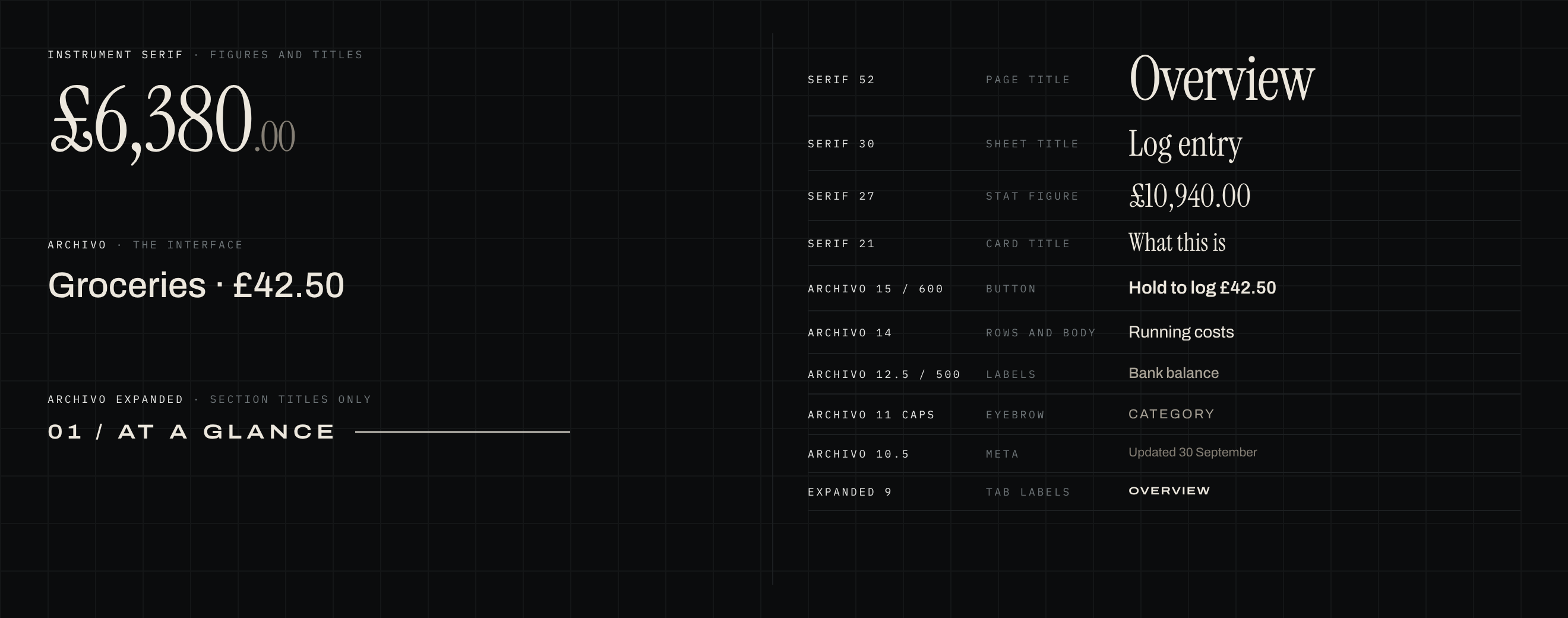
Type. Three typefaces with strict jobs: Instrument Serif for large figures and titles, Archivo for the interface and small figures, and Archivo Expanded for numbered section titles only. Every weight used is a font file in the app, so nothing is faked bold, and text grows with the iPhone’s text size up to the third accessibility size.
Components. Buttons have 12-point corners: filled for the main action, a hairline outline for the second, plain text for a way out. The hold button states exactly what it will write. Two kinds of choice are kept deliberately apart: a two-way toggle switches what a sheet shows, and radio buttons set a field’s value, so the two never look alike. The same views render in both themes from the same tokens.
Reading the numbers has its own set: section titles numbered 01, 02 with a rule running to the edge, statement rows that indent and dim the parts of a total, headline figures with the pence smaller and faint, and status written in plain words rather than shown in colour.
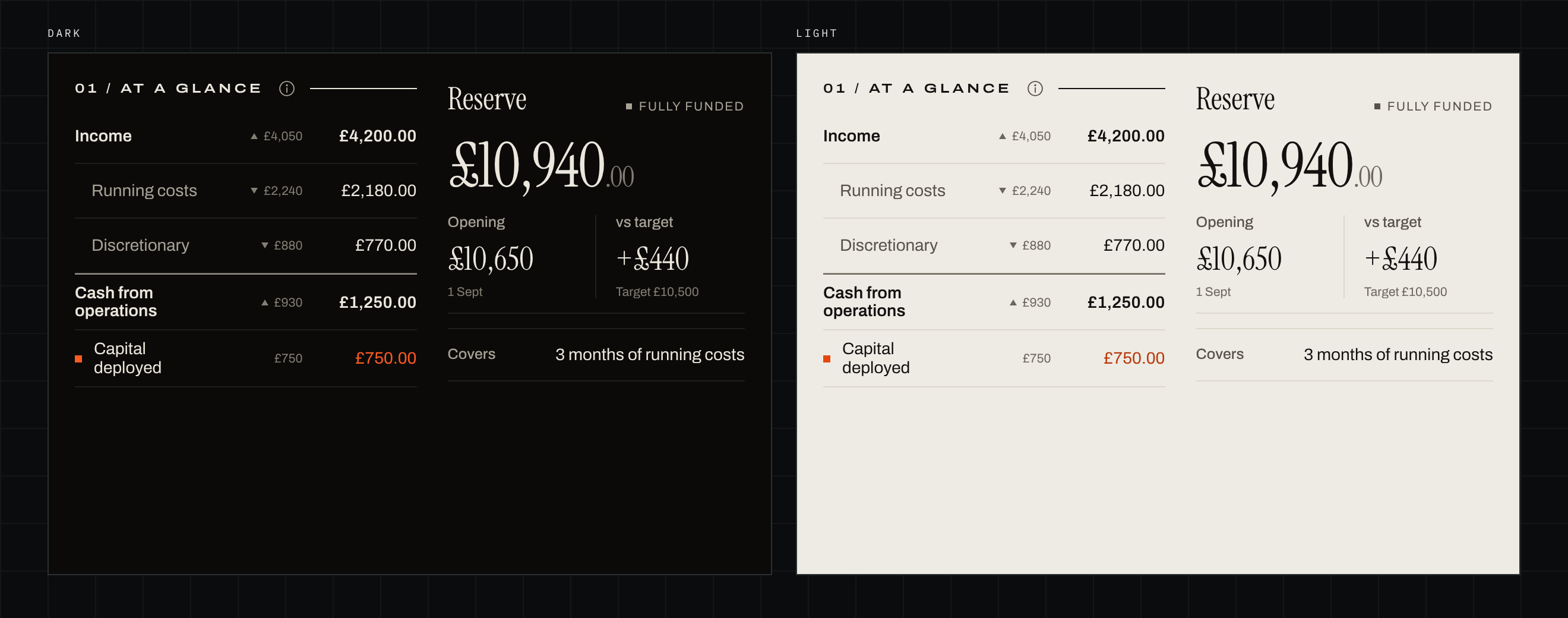
Charts. The horizon dial and the flow of funds are drawn from scratch; the other charts share one axis style, and Capital’s have range tabs underneath. Changes are shown with small grey triangles, never red or green, because a month that cost more isn’t automatically a bad month. Privacy mode masks every figure with asterisks, and figures and charts have VoiceOver labels.
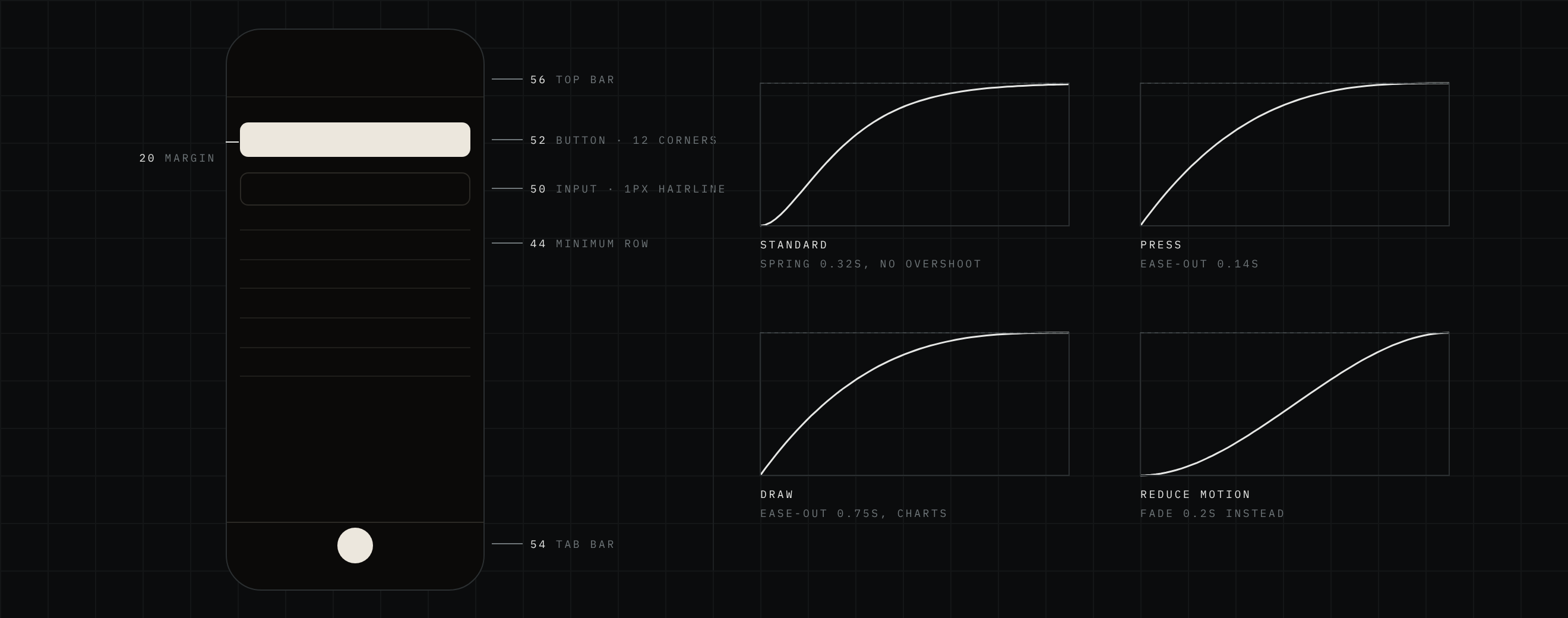
Space and motion. Pages sit on a 20-point margin, rows are at least 44 points tall so every one is easy to tap, and dividers are single hairlines. Motion follows one style, short and settled: a spring with no overshoot for changes of state, a quick ease-out under the finger, and a slower draw for charts. With Reduce Motion on, every movement becomes a short fade, and the haptics stay.
Taking it to market
Erkos is published by its own company, Erkos Software Ltd. The site at erkos.app explains the idea and the terms, and hosts a Learn page, practical money guides, a press kit and support. Every app image used outside the app (the site, the App Store screenshots, social posts and a short promo video) is generated from one set of mockups whose parts follow the SwiftUI code, so marketing never drifts from the product.
Pricing was kept simple: a free month, then £29.99 a year or £79.99 for lifetime, with a launch price until the end of February 2027. There’s no free tier, no adverts and no data to sell.
The outcomes
6 recordedThe spreadsheet proved the idea worked for one person. Erkos is that idea rebuilt so anyone can use it, without anyone else ever seeing their figures.
Result
A personal spreadsheet turned into a product anyone can run their money with, without their figures ever touching a server.
 Erkos — coming to iPhone
Run your personal finances like a business.
Log every pound by hand, read each month as a statement, and fund your future month by month. No account and no bank login: your data stays on your iPhone and in your own iCloud.